Role-Based Security
Protect employee data through role-based access, approval workflows, and accountable system activity.
HRIS Feature
Protect sensitive employee information through controlled access, approvals, and accountable activity.

Overview
Protect employee data through role-based access, approval workflows, and accountable system activity.
Key Features
Protect employee data through role-based access, approval workflows, and accountable system activity.
Keep requests, approvals, records, and status updates clear and easier to manage.
Use connected information and practical reporting to support faster decisions.
Protect sensitive HR information through controlled, role-based access.
Adapt permissions and workflows to the responsibilities of each team.
Bring operational records together in clear, practical HR reports.
System Preview
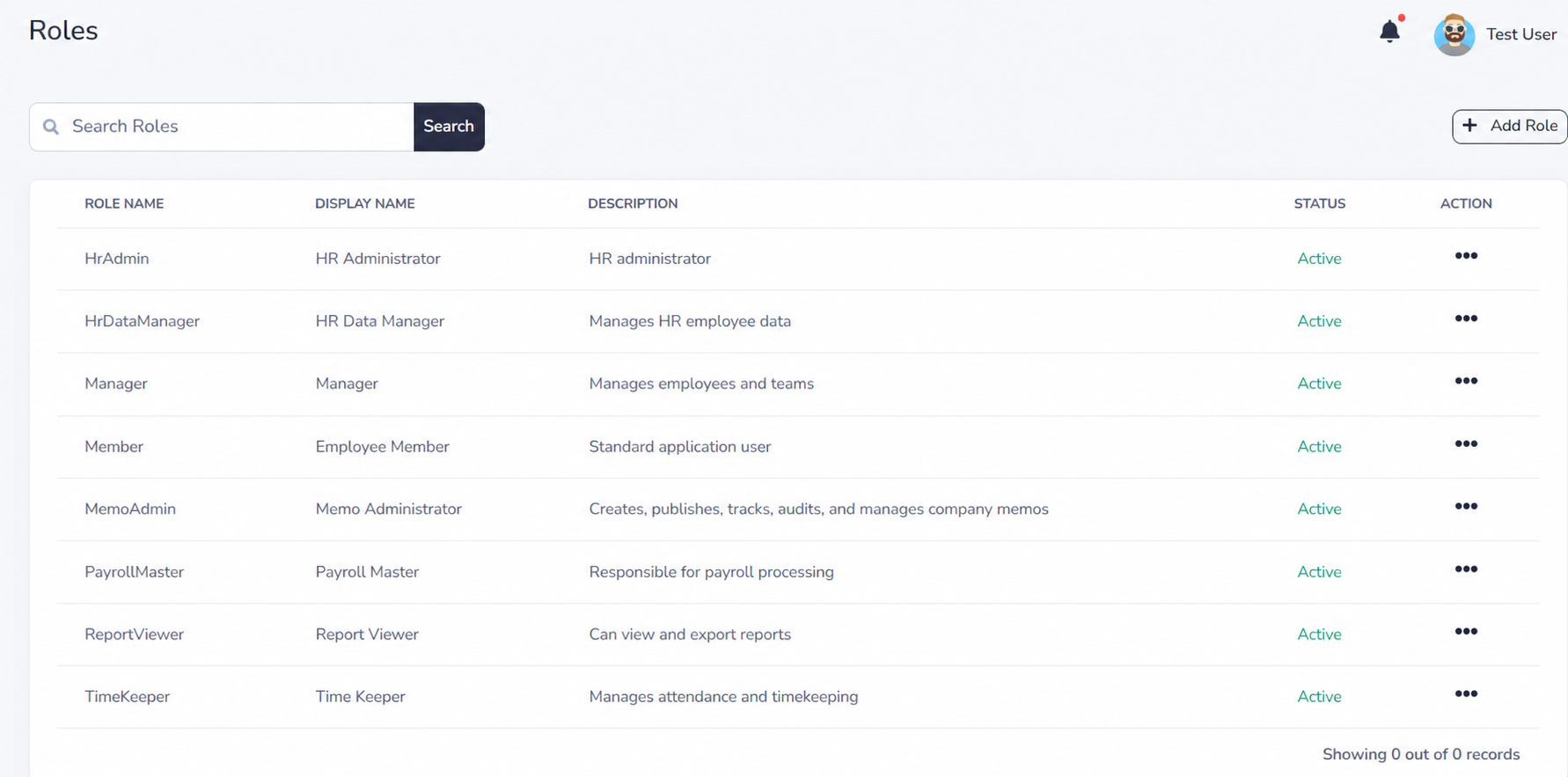
Explore privacy-safe examples of role setup, permission assignment, and controlled access across IcyPay HRIS.
Benefits

How It Works
Create a role that reflects a specific HR, payroll, manager, or employee responsibility.
Choose the modules, records, and actions that the role is allowed to access.
Apply the role only to employees who require its permissions for their work.
Limit visibility and authority by company, branch, department, and approval responsibility.
Review role assignments and accountable system activity as responsibilities change.
Build connected, dependable HR workflows with IcyPay HRIS.