Independent Recheck
Recomputes each employee's pay on its own, so a wrong formula shows up as a difference instead of being repeated.
HRIS Feature
Your smart checker for payroll: it reviews every payroll register before approval and flags issues so you can fix them first.
Overview
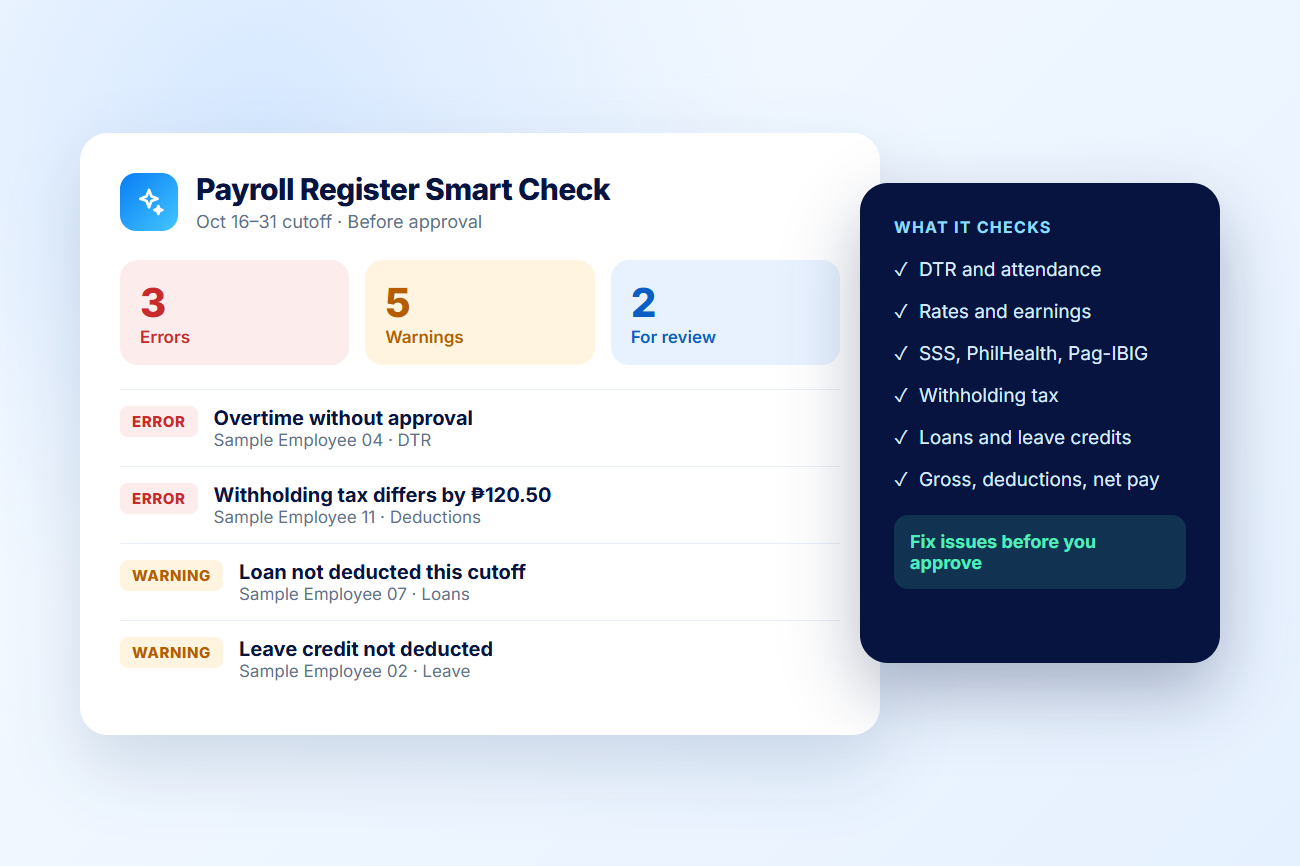
Before you approve a payroll register, the AI HR Assistant independently recomputes pay from attendance, rates, contributions, tax, loans, and leave, then lists every difference it finds—sorted into errors, warnings, and items for review.
Key Features
Recomputes each employee's pay on its own, so a wrong formula shows up as a difference instead of being repeated.
Flags overtime without approval, absences with time logs, single punches, and outdated DTR records.
Compares earnings, contributions, withholding tax, and totals against the expected amounts.
Catches loans that were not deducted, ledger mismatches, and leave credits that were not applied.
Groups findings into errors, warnings, and items for review so the most important issues come first.
The check never changes payroll data, and its results are not stored after you leave the payroll page.
Benefits

How It Works
Create the payroll register for the cutoff as usual.
Start the AI HR Assistant on the draft or pending register.
See errors, warnings, and items for review for each employee.
Correct attendance, requests, or adjustments, then refresh the payroll.
Approve the payroll once the check comes back clean.
Build connected, dependable HR workflows with IcyPay HRIS.